
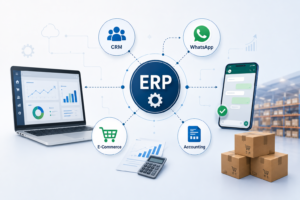
Most businesses don’t run on one system; they run on five or six. If you are looking for reliable ERP Integration Services, you are likely trying to solve the daily headache of managing disconnected tools. ERP Integration Services help businesses connect CRM, WhatsApp, accounting, and e-commerce into one unified ecosystem.
The result? Manual data entry, inventory drift, and customer inquiries that take four browser tabs to answer. ERP integration is the bridge that closes this gap. By connecting your ERP to the tools your team already uses, you stop the manual “copy-paste” cycle and create a single source of truth.
1. What ERP Integration Services Actually Mean
ERP Integration Services automate the exchange of data between your ERP system and other business applications, eliminating manual work and improving operational efficiency.
Key pairings include:
● ERP + CRM: Merges sales pipelines with fulfillment and finance.
● ERP + WhatsApp: Turns conversations into automated workflows.
● ERP + Accounting: Ensures invoices and ledgers remain reconciled without dual entry.
● ERP + E-Commerce: Syncs stock levels, orders, and customer data in real-time.
2. Why Disconnected Systems Are Costing You
When data lives in silos, it creates a hidden “operational tax.” An integrated ERP setup eliminates this by providing:
● Real-time accuracy: Inventory that reflects the warehouse, not just a spreadsheet.
● Speed: Automated order-to-cash workflows.
● Scalability: The ability to handle 10x the order volume without increasing headcount.
● Visibility: Management reports that aren’t a week out of date.
3. Strategizing Your Integration Stack
CRM & ERP: The Continuous Journey
By wiring your CRM to your ERP Integration Services, you connect the relationship to the fulfillment. Sales teams get visibility into stock availability and payment history without leaving their interface. Once a deal is closed in the CRM, it automatically triggers an order, invoice, and delivery note in the ERP.
WhatsApp: From Chat to Workflow
WhatsApp is where business happens, but it shouldn’t be a black hole.
● Lead Capture: New leads in the CRM trigger an instant notification to the right salesperson.
● Order Updates: Automated confirmations, invoices, and tracking links sent directly to the customer.
● Production Alerts: Real-time updates for job card completions or material shortages on the shop floor.
Accounting: Modernization Without Disruption
You don’t have to abandon your finance team’s preferred workflow. Integration allows you to sync masters (customers, suppliers, tax rules) and transactions (invoices, receipts, journal entries) automatically, ensuring your financial reporting is always audit-ready.
E-Commerce: Preventing the “Oversell”
Integration is most critical here. When an online order hits your store, the ERP immediately adjusts inventory across all channel including your physical retail presence preventing the nightmare of selling stock you don’t actually have.
4. The Golden Rules of Implementation
Integration projects rarely fail because of the code; they fail because of the strategy. Follow these rules to keep your project on track:
| Data Type | Primary System (Source of Truth) |
| Customers | CRM |
| Accounting | ERP |
| Inventory | ERP |
| Orders | E-Commerce |
| Communication |
Define Ownership: Use the table above. When two systems try to “own” the same data, you get conflicts.
API-First: Avoid file dumps or CSV imports. Use robust, real-time APIs for reliability.
Automate in Stages: Start with the “Highest Value” connection usually CRM to ERP before layering on WhatsApp or third-party marketplaces.
5. The Future: AI and Low-Code
The barrier to entry is lower than ever. Modern platforms like ERPNext leveraging low-code workflow engines mean you no longer need a massive dev team to build complex integrations. AI is also beginning to provide predictive sales forecasting and automated financial analysis, turning your ERP from a record-keeping tool into a proactive growth engine.
Frequently Asked Questions (FAQ)
Q: Do I need a team of developers for ERP integration?
A: Not necessarily. With low-code platforms and modern ERPs like ERPNext, many integrations can be handled via built-in webhooks or integration platforms like Zapier. However, complex custom logic often benefits from professional implementation.
Q: How long does a typical ERP integration take?
A: It depends on scope. A single-point integration (like Shopify to ERP) can take a few weeks, while a full-suite integration across CRM, Finance, and WhatsApp can take several months. Always prioritize an MVP approach.
Q: How do I know which system should be the “Master” for customer data?
A: Follow the workflow. If your sales team initiates the relationship, the CRM is your master. If your accounting team manages the credit limit and invoicing, the ERP is the master for financial customer data.
For more Information : Read More
Ready to bridge the gap in your business processes? Whether you are looking to streamline your procurement hierarchy or automate your customer journey, implementing a unified system is the most important step you can take in 2026 Reach out to Exacuer Global services Pvt. Ltd.